Quick study methods are efficient learning strategies designed to help students grasp and retain information in less time. According to Dunlosky, Rawson, and colleagues (Psychological Science in the Public Interest, 2013), these techniques play a vital role in boosting educational outcomes.
Effective study strategies include:
- Scheduling
- Considering your chronotype
- Studying in a comfortable environment
- Taking effective notes
- Taking breaks
- Creating mind maps
- Using online tools
- Switching subjects daily
- Avoiding multitasking
- Focusing on the learning process
- Aiming for understanding over memorization
- Training your brain
If you’re wondering how to study more in less time, keep reading this article prepared by Custom-Writing.org experts. It breaks down each strategy and offers tips to help you apply them in your studies.
⌚ Why Do Your Studies Take so Much Time?
A great starting point is to analyze your studying pattern to see what mistakes you usually make while learning.
We’ve listed some common ones below:
- No planning, no schedule, and no priorities. Some students prefer to focus on random assignments, depending on what they WANT to do rather than what they NEED to do.
- Leaving everything to the last minute and then cramming. This strategy has proved to be not effective at all. You may pass your exam, but you’ll quickly forget what you’ve learned after you’re done.
- Having too many distractions while studying. Gadgets, TV, music, loud family members, etc.—all these factors will keep you from progressing too much.
- Trying to remember everything without taking any notes. Rely on your brain wisely. It can process and store a lot of information, BUT you have to gradually fill it and leave some written notes to refresh it later.
- Leading an unhealthy lifestyle. Being sleepy, not exercising, and eating junk food are harmful activities for your body and studies.
There are many more mistakes that high school and college students make, of course. So make a list of your own and start improving. Meanwhile, our 12 tips will help you get on your way.
🏃♀️ How to Study Fast in Less Time
Anyone can boost their efficiency and improve their study skills. They just need to learn some tips and hacks to do so.
Let’s go deeper into the matter and see what students who are tired of studying can study more effectively.
1. Make a Schedule
The number-one secret to effective studying is to plan out all the things that have to be done and learned and then schedule them accordingly. Spend some time finding out more about time-management skills. It will completely change your approach to your studies.
We all know the saying, “Nothing makes a person more productive than the last minute,” but not in our case… If you plan everything for the last minute, you risk losing time and ending up with a low-quality assignment. And no time left to set it right.
Still wondering how to save time for study?
Just think, plan, and act in advance.
2. Let Your Brain Choose the Best Time
If you want to make the most of your studying time, you first need to identify the time when your mind is ready to interact and perform at its best. Most people can think, memorize, and produce their freshest thoughts after a night of good, sound sleep. Your body feels rested and can offer you its highest working capacity.
The thing is:
The exact time of day that’s optimal can vary from one person to another. Some people feel too sleepy after a full night’s sleep, and all they can do is to yawn and make themselves a coffee cup.
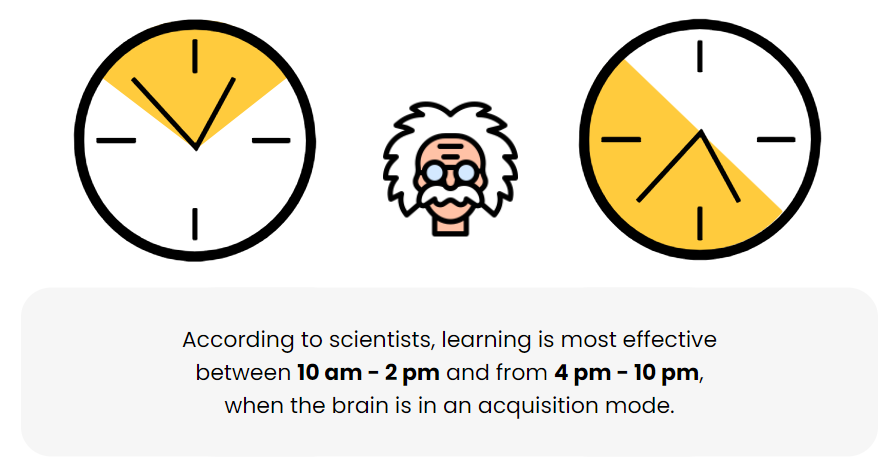
Hopefully, your best performance time is not during the night. Otherwise, you’d have trouble combining your day and night studies. Remember that you also need 6-8 hours to sleep to stay healthy!
3. Study in a Quiet and Comfortable Place
Trying to concentrate at home, where it’s always noisy and loud, can be a super-complicated task. You will hardly have high performance in a place with so many potential distractions.
In this case, we’d recommend that you look for a quieter place to study.
Why not go to a good old library? Or maybe your local internet café?
You’ll find some more excellent suggestions at ThoughtCo.
4. Take Notes in Class and at Home
Note-taking is something that you can’t do without if you want to learn how to study faster. You might try to object, thinking that taking notes takes too much time.
But does it?
You’ll indeed spend some time taking notes. Then again, you’ll save way more time when studying at home and preparing for the exam.
- You’ll have all the necessary data and references collected in one place.
- You’ll recall the critical information taught during your lessons (something that you might not find in books).
- You’ll memorize faster when you write the information out—writing works much better for your memory than typing!
- You’ll immediately refresh your memory on all the key points that you’ll need for your test.
The note-taking method ends up being one of the best studying methods for those who wonder how to study for a test fast and effectively.
5. Take Breaks
Incredible as it may seem, taking regular breaks during your studies will save you time. The secret is giving enough of a break to your brain to increase its performance.
Don’t sit still for hours.
Instead, get up every 30-60 minutes, remembering to stretch your legs and hands. This way, you’ll avoid stiffness and muscle cramps. You may even choose to do some more vigorous exercises to launch your metabolism and make you feel more energized. By moving your body, you’ll also improve your concentration, memory, and creativity.
📚 How to Study More in Less Time
With our tips, you’ll be able to:
- spend a minimum amount of time learning;
- have a busy and entertaining social life;
- and end up with As on any assignment or exam.
We interviewed a dozen A-level college students who always manage to spend just a little time studying. They told us about some effective learning techniques and tricks that we listed below.
6. Use Mind-Mapping
Organize your ideas into maps, clouds, diagrams, charts, tables, etc. to make your facts visual and memorable. This study method is sure to boost your performance and save some time, especially if you’re a visual person.
You can take this method one step further and use mind map tools online, like Popplet or Spiderscribe, where you’ll collaborate with your classmates, brainstorm thoughts, exchange ideas, and share your maps.
Don’t you think this would save tons of your time while studying?
7. Use Online Tools for Learning
Online tools are not only fun, but they can also serve different purposes and increase your productivity.
Here’s how they can help you:
- Develop your creative and critical thinking skills.
- Collaborate and exchange ideas with classmates, friends, and peers.
- Perform research using rich online content databases.
- Organize and manage your information.
- Find an optimal studying method through a learning style quiz.
- Deepen your knowledge through the ability to take free online courses.
Make sure to read more details about 36 Best Websites for Full-Fledged Learning and look at our custom writing service.
8. Study Different Subjects Every Day
Have you ever noticed that focusing on just one particular subject each day is not as useful as studying a couple of them each day?

Let’s look at an example:
Imagine you have to prepare for final exams in literature, chemistry, math, and law. It will work better if you study each subject a little bit every day. Focusing on only writing on Monday, chemistry on Tuesday, math on Wednesday, or law on Thursday might be too much. The sheer volume of information on each subject may make you feel overwhelmed.
You’ll learn much faster and retain that knowledge better if you spend, let’s say, one hour on each subject every day. This way, your brain will have more time to process and absorb the new material.
9. Don’t Multitask
Unless you want to become less productive and more distracted, don’t multitask in anything you do. Your studies will take less time if you focus only on what you’re currently learning.
Want some essential tips on how to improve concentration and how to prepare for exams effectively?
Here you go:
- Organize your study area and clear any clutter on your desk.
- Prepare everything you’ll need for your studies before starting.
- Put your gadgets away or switch them to airplane mode.
- Log out of all your messengers.
- Use apps to boost your productivity.
10. Focus on Learning, not the Grades
When you study, you shouldn’t concentrate on the mark you’re going to get. Focus on the process instead. Learn to enjoy it, and high grades will automatically come to you.
All the students we interviewed have one more study habit: they set learning goals, not performance goals.
Performance goals (e.g., getting an A on the next academic essay assignment) are set by students who want to look smart and prove themselves to others.
Learning goals (e.g., learning ten new Spanish words a day) are set by those who want to develop their skills and master the subject.
11. Don’t Memorize, but Rather Understand
This approach is also crucial for those who want to know how to study better.
Learning by heart is one of the common mistakes that many students make. This method ends up being incredibly time-consuming and involves your short-term memory retention primarily. Your understanding and ability to draw conclusions are the skills you have to develop and demonstrate to your professors.
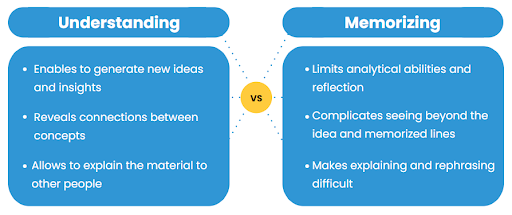
Focus your attention on understanding what you’re learning and analyzing it critically.
Do you have a complex topic? Then try these tips:
- Create associations between concepts. Our brain learns by making connections between new information and what has already been acquired. As soon as you discover some similarities between your new topic and some concepts that you already comprehend, you’ll quickly come to understand the subject matter.
- Imagine the data you’re learning vividly. Think visually; direct a movie in your mind to help you memorize the facts faster. For example, it’s difficult to remember numbers alone, so instead, you should associate each one with a picture and create a short narrative using them. Our minds like stories and retain them for a more extended period than plain figures, facts, etc.
- Pay attention to regular patterns within the new topic. If you notice patterns and monitor their frequency, you’ll easily comprehend the subject matter’s whole framework.
12. Train Your Brain
If your brain works more quickly and efficiently, you are sure to save plenty of time while studying. Sounds logical, doesn’t it?
The good news is that you can exercise your mental muscles just like you do the rest of your body!
Just look at these actionable tricks to boost your brain capacity:
- Use Sudoku to improve your problem-solving abilities. You might even find this puzzle game somewhat addictive after you try once. Buy this game on paper or find it free online.
- Practice math daily. Create a Mad Math Minute worksheet or use printable worksheets. Give yourself 1-5 minutes to solve as many problems as you can. This exercise will keep your brain in good shape. And you won’t need your calculator as frequently as before.
- Learn something new every day. Spend at least 30 minutes a day reading a newspaper or a book. Another way is to use Wikipedia. Just choose any random article, enrich your knowledge, and keep your brain healthy.
- Pretend that you’re teaching. The trick is that when you teach, you always want your students to understand the concept and know how to do it the right way. So, if you imagine that you’re teaching, you’re more likely to avoid mistakes and do it in the best possible way.
- Visit specialized brain-training websites or apps regularly. For example, a cool site like Lumosity lets you decide what exactly you want to train (attention, speed, memory, problem-solving, or flexibility). Then it gives you corresponding exercises that are both easy to understand and interesting to play. Afterward, you get your rating for that skill. You aim to improve your results as you practice.

💡 Study Smart, not Hard
You should remember that the way you have aligned your learning process can make or break your college or university success. A “smart studying” approach will save you a tremendous amount of time that you would otherwise lose if you study “hard” instead.
The whole studying process comes down to your “focus.” To improve your focus and learn anything faster, you need to choose the right study strategy. It will allow you to comprehend the essence of the subject matter and then immediately connect it with any newly encountered concepts.
First, you need to critically analyze your current learning approach and see what is consuming too much time. Then follow our proven tips to increase your performance and decrease the time you spend on your studies.
We believe in you: you can do it!
Thanks for reading our article! We hope our study tips and tricks were helpful for you. Share them with your peers who may need them too.
Learn more on this topic:
- Best Note Taking Templates for Effective Learning
- Must-Know Test Taking Tips & Strategies
- Bloom’s Taxonomy—How to Make Your Studying Perfect?
- Bloom’s Taxonomy: Apps to Improve Your Studying
🔗 References
- Studying 101, Study Smarter Not Harder: Learning Center, the University of North Caroline at Chapel Hill
- How to Effectively Study: S. C. Pan for UCSD Psychology
- 5 Super Efficient Ways to Learn More in Less Time: Inc.com
- General Study Tips: Dartmouth College
- 12 Steps to Effective Studying: Student Success Center, Cuesta College
- Improving Students’ Learning With Effective Learning Techniques by Dunlosky, Rawson, et.al.


![41 Top Study Blogs for Students in College [2026 Upd.]](https://custom-writing.org/blog/wp-content/uploads/2020/12/students-in-a-library-284x153.jpg)





![15 Basic Writing Rules – Common Mistakes & Fixes [2026 Upd.]](https://custom-writing.org/blog/wp-content/uploads/2020/12/people-performing-their-job-duties-coworking-space-284x153.jpg)

![Left Brain vs. Right Brain: Characteristics Chart [INFOGRAPHIC]](https://custom-writing.org/blog/wp-content/uploads/2020/12/left-right-brain-concept-284x153.jpg)

Good job! This blog is so informative about the study hacks to save the time in exams and get the high grades. There are some hacks about maintaining the time, watch your watch, sleep well, environment savvy and many more hacks which are so helpful to organise yourself.
its so good for me to study but I also have some tricks to study for school student
1] take a subject book
2] and read it loudly and imagine you are a teacher and teach to you
3] and mark the important things and write it in a paper
4] after you wrote read it and ask question to you and answer
5] after answering all the questions not seeing the points and compare the points and
the questions answers if it was correct you can go to another term or subject etc
if you wanna study fast you want to read it and teach to you by yourself and memorize the points and tell the points to you
I HOPE IT WILL WORK FOR ME TOO.I WILL EXECUTE THIS.this is very useful tips.thank you so much for your suggestions.Very good content for students, keep sharing and to know more click best engineering college in navi mumbai
GRATEFULL TO READ THIS ARTICLE I HOPE IT WILL WORK FOR ME TOO.I WILL EXECUTE THIS.this is very useful tips.thank you so much for your suggestions.Very good content for students, keep sharing and to know more click top engineering college in navi mumbai
A lot of ideas just reading them makes you realise learning the advice and practicing with tools 🛠 is big experience itself without getting to the Hopi s one needs to learn.
Should be time management to change yourself to better situation
Thanks for sharing an informative article. I was looking for such kind of information as my sister is planning to do Biotechnology course from Chandigarh Group of Colleges Landran. This article will be helpful to her and clear her doubts.