To succeed in academic writing, you need to learn how to write a 5-paragraph essay. Fortunately, mastering this format is simple if you follow a few basic steps:
- Make a 5-paragraph essay outline.
- Create an introduction with a strong thesis.
- Support it with three main points—each in its own body paragraph.
- Wrap everything up with a good conclusion.
As you can notice, a 5-paragraph essay structure includes an introduction, three body paragraphs, and a conclusion. It’s one of the core techniques taught in primary English education. Want to learn more about writing an outstanding five-paragraph essay? Keep reading this article by Custom-Writing.org experts! Here, you’ll find a description of all the parts of a 5-paragraph essay, examples of well-written papers, a helpful writing guide, creative topic ideas, and more. Let’s get started!
📑 5-Paragraph Essay Outline
This genre is probably the most structured type of writing. It starts from a broad explanation and definitions, continues with narrow argumentation, and finishes with another broad generalization. The Hamburger Format can help you memorize the step-by-step essay structure.
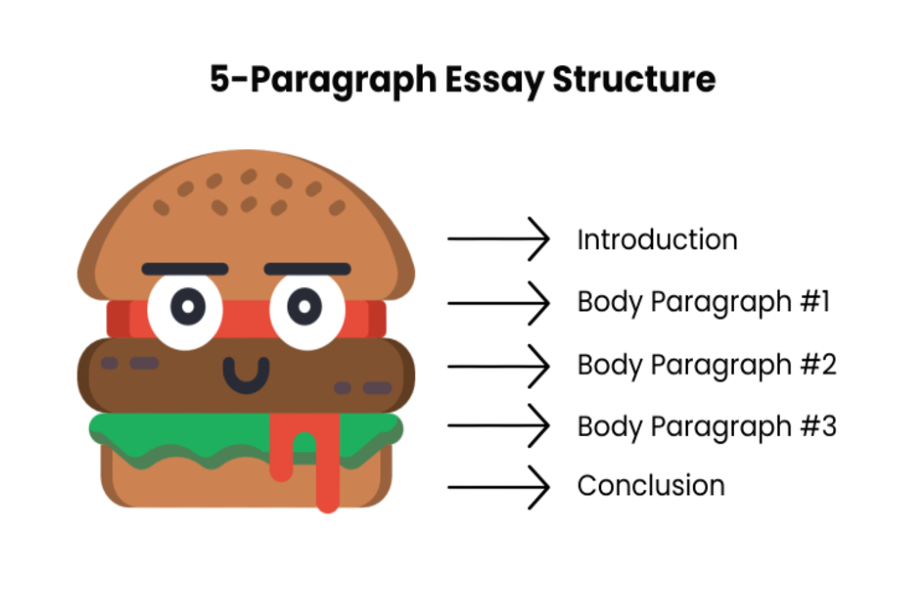
Top Bun: Five-Paragraph Essay Introduction
The first sentence is usually a hook. It may be a rhetorical question, a stunning fact, or an example from real life. Its purpose is to make the reader interested in what’s going to come next.
Example:
It is hard to recollect that some 20 years ago, cell phones used to be a luxury.
Then you are supposed to provide a “trailer for the movie:” hint what you are going to talk about, without revealing the plot. Two or three sentences will suffice.
Example:
Secondary school teachers can tell the children to put away their gadgets, but this practice becomes hardly possible at college, where adult people are taught.
The last sentence of an introduction is a thesis. It introduces your message to the reader and is usually arguable.
Example:
This essay explores why it is morally permissible to introduce cell phone control at colleges and what results it may entail.
5-Paragraph Essay Body
Lettuce: Paragraph #1
- The first paragraph should provide the most prominent and substantial argument.
- Start each paragraph with a topic sentence. It links your ideas to the thesis statement. If at some point, you realize that there is a discrepancy between your topic sentences and the thesis, you should update the latter.
- Then comes the evidence or explanation. Avoid generalizations here. Defend your argument in the most concise manner. If any words could be left out, they should be deleted.
- Finish each paragraph with an analysis: how does it refer to your thesis?
Tomato: Paragraph #2
The second and third paragraphs follow the same structure. Your “tomato” argument is the weakest and less evident than the first one.
Burger: Paragraph #3
Dedicate the last paragraph to the most persuasive claim. In an argumentative essay, the third paragraph dwells upon the opposing opinion, substantiating its wrongness.
Bottom Bun: Five-Paragraph Essay Conclusion
A conclusion intends to summarize the main body paragraphs and restate the thesis in different words. The last sentence of your conclusion should indicate that the text is over.
Example:
Having considered everything mentioned above, it shall be stated that the use of telephones ruins the learning process and should be controlled.
5-Paragraph Essay: Outline Template
To simplify the outline above, feel free to use the following 5-paragraph essay template. It will do for any essay length.
- Introduction
- hook
- “movie trailer”
- thesis statement
- Paragraph #1, 2, and 3
- topic sentence
- evidence
- analysis
- Conclusion
- summary
- allusion to thesis
- overall concluding sentence
How Many Words Is a 5-Paragraph Essay?
A typical five-paragraph essay is 500 to 1000 words long. However, for easy writing, the average of 250 to 500 words is admissible. This word count should be distributed among the introduction, three body paragraphs (each consisting of a topic sentence and at least three evidence sentences), and the conclusion.
👣 How to Write a 5-Paragraph Essay: 7 Steps
Step 1. Choose Your 5-Paragraph Essay Topic
As a rule, the teacher provides the topic or at least the scope of topics in the assignment. However, it may happen that you will have to come up with your own theme. To avoid changing the title in the course of writing and starting the whole work from the beginning, make sure you observe the following rules:
- Avoid overused subjects if you don’t want half of your classmates to have similar essays.
- Try to find a narrow topic that suggests an argument.
- The best topic is the one that you would argue with your friend for hours. If you feel excited thinking about it, your readers will enjoy learning about your opinion.
Step 2. Create Your Thesis Statement
Simply put, the thesis statement is the point of your essay. A well-developed thesis statement is a one- or two-sentence summary of what your essay shows and how it shows it. In other words, it should outline the points that will be made in your body and indicate the conclusion made from those points.
A thesis statement is the centerpiece of your essay. And this is why writing a thesis statement should happen first. It shouldn’t be the first sentence of your essay, but it must be in your introduction. Ideally, the thesis statement should be tucked into the middle or end of the first paragraph while writing essay introductions.
Here are a few thesis statement examples to make sure you understand the idea:
Thesis Statement Example #1
Example:
“There are many organic foods available today, but the vast majority of conventional foods can be eaten without any concern about the consumption of toxic pesticides. This is because many foods are not grown with pesticides, while thick peels cover the edible parts of other crops, and some agricultural foods are grown with nontoxic pesticides.”
Thesis Statement Example #2
Example:
“Detroit did not become the automotive capital of the United States overnight. Rather, automotive manufacturing became established in Detroit because of its position in proximity to raw materials like steel, navigable waterways, and the efforts of local entrepreneurs.”
Thesis Statement Example #3
Example:
“Three key design elements that defined the Art Deco movement were bold geometric shapes, rich colors, and luxurious ornamentation.”
Notice the similarities shared by these thesis statements. They each list three points that will be elaborated on in the body. Five paragraph essays rely upon this magic number of 3 points, which is discussed next. And you can also imagine the essay that each of these statements belongs to.
Step 3. Structure Your 5-Paragraph Essay
Five paragraph essays require a very special sort of discipline. In this case, you only have five paragraphs to work with, so there is only one structure that makes sense: one introduction paragraph, three body paragraphs, and one conclusion paragraph. Above there is detailed information about the five-paragraph essay outline. In the next few paragraphs, its part’s goals and the ideas they should convey are described in more detail.
Step 4. Write Your 5-Paragraph Essay Introduction
The purpose of an introduction is to demonstrate the focus of the essay. An introduction should provide enough information to orient the reader to the essay subject, state the thesis statement, and roughly outline the body’s content.
- When you are writing an introduction, you first need to grab the attention of the reader. Your introduction’s first sentence should be a bold statement, a striking fact, or a provocative question. The trick here is to use something memorable. This is one reason many essays begin with a famous quote.
- After you have the attention of the reader, give a little more background about your essay topic.
- Then use your thesis statement to indicate what your essay is about clearly.
- After this, you should conclude your introduction with a quick summary of the points you will be making in the body.
Step 5. Write Your 5-Paragraph Essay Body
The purpose of a body is to explain the content of an essay. If you are writing a standard college essay, like an argumentative essay or an analytical essay, each of these paragraphs will unfold one of the points you mentioned in your introduction.
Every paragraph of the body is like a miniature essay:
- Each paragraph has a point or thesis statement
- Each paragraph starts with an introductory sentence
- Each paragraph ends with a brief conclusion
If the body paragraphs feature separate topics, sometimes they will appear disconnected to your reader. Transition sentences fix this problem. As the first or last sentence of a body paragraph, they help transition the reader from one idea to another.
There are countless ways to write transitions, but this is the easiest process. Write each of your body paragraphs as you naturally would. And then revise your text to link the ideas with transitions. One of the basic essay example thesis statements was from an essay about the automotive industry in Detroit. You could link a paragraph about access to raw materials with a paragraph about adjacency to waterways using the following transition sentences:
Transition Sentence: Example #1
Example:
“Steel was cheap because it was produced near Detroit, but this raw material was made even cheaper by the Great Lakes’ nearby waterways.”
Transition Sentence: Example #2
Example:
“Proximity to coal and iron ore was not the only advantage Detroit had in becoming the automotive capital of the 20th century.”
After you’ve written your essay, go back and check to make sure that you use a transition sentence between every paragraph. Often, you can turn the first or last sentence of a paragraph into a transition.
Step 6. Write Your 5-Paragraph Essay Conclusion
A conclusion should repeat the arguments you’ve made throughout your essay. If you are having a hard time figuring out how to start writing it, here are two ideas. First, you could try using a transition sentence that connects the last paragraph of your essay’s body to the thesis statement. Second, you can simply reword your thesis statement, starting with “in summary.” The first approach is better, but the second works if you are in a rush. Alternatively, you can use a paragraph summarizer to get the idea of how the conclusion for your particular text may look like.
Step 7. Edit Your 5-Paragraph Essay
For most essays, you will have time to check your work and revise it. Though exams and tests may limit you, try to budget enough time to reread your essay. As you are doing that, here are some great questions to ask yourself. As you answer these questions about your writing, try to put yourself in the position of your reader.
- Will the introduction grab the reader’s attention immediately?
If not, try a shorter, bolder, stronger first sentence. - Will the thesis statement be clear to any reader?
If not, rewrite it using shorter, simpler statements. - Do the body paragraphs flow from one to the next?
If not, try changing the order of the paragraphs and/or inserting a transition sentence between paragraphs. - Does the conclusion effectively summarize the essay?
If not, you may need to rewrite the conclusion by focusing on the essay’s thesis statements and each body paragraph.
The top trick for how to write a college essay is, of course, the same top trick for writing a high school essay or any other writing at all—that is, rewriting. This is the stage when good writing becomes great writing. This is your chance to fix the issues you uncovered while rereading your essay. Keep it simple. If you encounter a difficult sentence to understand or is more than two lines long, try to figure out ways to break it up. Simplifying your ideas is an essential part of the rewriting process.
📝 5-Paragraph Essay Examples
In this section, you’ll find a free 5-paragraph essay sample. It focuses on the disadvantages of home-based education. Note that the full version of the text is downloadable!
Disadvantages of Home-Based Education
Example:
Currently, education seems to be more accessible than ever before. The technological progress of the last century rendered information and learning instruments more available, facilitating alternative education types such as home-based learning. Compared to formal education, homeschooling practices seem to have a long-standing history since for a significant part of human existence knowledge and skills were transmitted directly from parents to their offspring. Although home-based education predates formal schooling, its long history should not be the reason to select this type of education since it has several downsides: effectiveness, socialization, and time and monetary resources.
5-Paragraph Essay Topics
- Cooperation of Treyarch and Pepsi’s from the virtue ethics perspective.
- Examine the situation with food packaging litter in Ireland.
- Should World Trade Organization tasks and policies be revised?
- Discuss how Codex Hammurabi helps to understand the judicial system of ancient Babylon.
- Analyze the stylistic devices Elie Wiesel uses in his novel Night.
- What can be done to prevent ventilator-associated pneumonia?
- Analyze the storming of the Bastille.
- Describe the different meanings of the term honor.
- Why the Internet is an effective instrument of advertisement.
- How artificial intelligence facilitates the accountants’ work.
- The collaboration agreement and its advantage to companies.
- Analyze the Ritz-Carlton Hotel’s company.
- Analyze the importance and methods of quantitative research.
- Why do we have to protect sharks from extinction?
- The influence of peers on behavior change of teenagers.
- The role of clothing designer in a movie production.
- Discuss college experience of a nursing student.
- How to get rid of fear of public speaking.
- Analyze the development of the U.S. household appliance stores.
- Foreign relations of Korea in the first decades of the 19th century.
- Review of the article Why the Student Loan Crisis Is Everyone’s Problem?
- Describe the main character of Sophocles’ Oedipus the King.
- The effect of cancer on the DNA replication.
- Are the anti-bullying programs really working?
- Examine the rhetorical techniques used in Shirley Jackson’s The Lottery.
- The pathogenic bacterium of streptococcus: definition, prevention, and treatment.
- Explore the task of the manager in modern empowered teams.
- Analyze the reliability of the article Metropolitan Area Employment and Unemployment.
- Discuss the issues and possible solutions for the gifted education program.
- The impact of COVID-19 pandemic on social media activism.
- The effectiveness of sensitivity training against workplace prejudices.
- How does a vacuum cleaner work?
- Describe the ways media can promote terrorists’ agenda.
- The role of prayers in major world’s religions.
- The defining traits of Meursault in The Stranger by Albert Camus.
- Describe the field experience at the science lesson.
- Discuss the importance of employee motivation.
- Benefit corporations as a new element of modern business.
- Role of advertisement in creating the nursing image.
- Is goal attainment theory compatible with personal nursing philosophy?
- Why it is critical to eliminate orientation-based prejudices in the workplace.
- Reasons of the failure of Superior Bank FSB.
- The crucial meaning of a qualified nurse for preservation of patient’s health.
- Compare different ideas of a good life from an ethical perspective.
- The importance of development the cybersecurity industry.
- Explore how the authors reveal the theme of true freedom in The Cask of Amontillado, Dark They Were and Golden-Eyed, and The Story of an Hour.
- Shakespeare’s sonnets from the perspective of Lynne Magnusson.
- The interpretation of healthcare in Health Care Reform and Equity by Fiscella.
- How can a leader establish a friendly and calm atmosphere in the team?
- Role of social media in promotion of positive changes in society.
🔗 References
- The Ultimate Guide to the 5-Paragraph Essay: Grace Fleming, ThoughtCo
- Ending the Essay, Conclusions: Pat Bellanca, for the Writing Center at Harvard University
- Writing Paragraphs: The Writing Centre, University of Ottawa
- Essay Introduction: OWLL, Massey University
- The Basics of Effective Essay Writing: Becton Loveless, Education Corner
- Suggestions for Proofreading Your Paper: Purdue Writing Lab
- Basic Essay Structure: The Five-Paragraph Essay (Study.com)
- Example Five-Paragraph Essay (UW Madison)
- Write Your Essay | UNSW Current Students

![Best Descriptive Essays: Examples & How-to Guide [+ Tips]](https://custom-writing.org/blog/wp-content/uploads/2021/01/pencil-notebook-white-background-284x153.jpg)






![Short Story Analysis: How to Write It Step by Step [New]](https://custom-writing.org/blog/wp-content/uploads/2020/12/man-sits-end-trolltunga-before-mountains-284x153.jpg)

![Common Essay Mistakes—Writing Errors to Avoid [Updated]](https://custom-writing.org/blog/wp-content/uploads/2020/12/avoid-mistakes-ccw-284x153.jpg)

What a great post, Julia! I have loved it with passion. In fact, you have demystified the mysteries of essay writing. God bless you.
Some genuinely nice and utilitarian info on this internet site, also I conceive the design and style has superb features.